Describe a song in words, get a finished track
Text to music, without the production learning curve. Describe the song you hear in your head — 'lo-fi hip-hop with a rainy-night piano and vinyl crackle at 80 BPM' — and the AI music generator writes and produces a finished track around it. Vocals or instrumental, any genre, any mood: your prompt is the only instrument you need to play.
Plans and pricing
Everything on this page works for free today, and two optional credit packs are ready to buy — one-time purchases, no subscription. The free tier below is what you can use right now.
- Free — $0. One AI generation per day. Each generation creates up to 2 original track variations from your text prompt (or your own lyrics), ready to stream and download as MP3. On the free tier the licence covers personal and non-commercial use.
- Starter Pack — $2.99, one-time purchase, no subscription. Adds 30 AI song generations. Credits valid for 12 months from purchase. Each generation creates up to 2 original track variations from your text prompt (or your own lyrics), ready to stream and download as MP3.
- Power Pack — $9.99, one-time purchase, no subscription. Adds 120 AI song generations. Credits valid for 12 months from purchase. Each generation creates up to 2 original track variations from your text prompt (or your own lyrics), ready to stream and download as MP3.
Starter Pack
$2.99
- 30 songs included
- Credits valid for 12 months from purchase
- one-time purchase, no subscription
- Personal use only
Buy Starter PackPower Pack
Best value$9.99
- 120 songs included
- Credits valid for 12 months from purchase
- one-time purchase, no subscription
- Commercial license included (YouTube/Spotify monetization)
Buy Power PackUsage of every pack is governed by the Terms of Service, which is where the licence question is answered in full.
What is AI music generation?
AI music generation turns a text description into audio. Instead of recording instruments, you write what you want — style, tempo, mood, instrumentation — and a generative model composes and renders a complete piece: chord progression, arrangement, mix, and, if you want them, sung vocals with lyrics it writes to match.
The output is fully synthesized audio, not a collage of samples. Every generation is a new track that didn't exist before you typed the prompt, which is what makes generated music safe as original background music where licensing real songs would be expensive or impossible.
How to generate AI music online
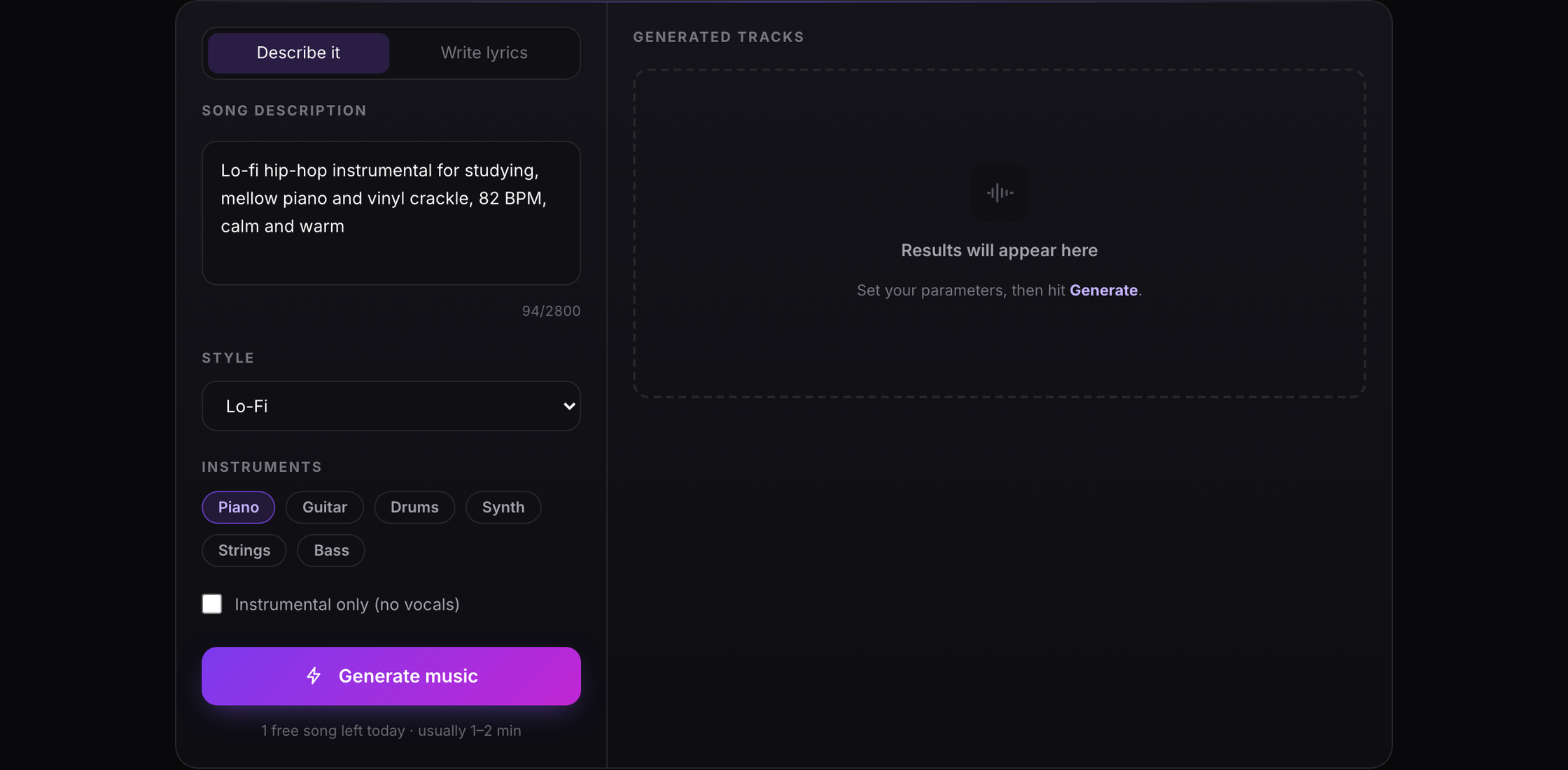
The workflow is the same everywhere, including here: describe, generate, iterate. Concretely, on this page: type a description of the track — the more specific, the better (genre, BPM, instruments, the feeling you're after). Optionally pick a style preset and instrument accents, and choose instrumental-only if you don't want vocals.
Hit Generate. The model usually takes a minute or two to write and render the song, and returns two variations so you can pick the take that lands. Preview both in the browser, download the one you like as an MP3, and feed it into any editor or DAW.
Prompts beat presets. 'Upbeat pop' gives the model room to improvise; 'upbeat 2010s dance-pop, 120 BPM, bright piano stabs, handclap backbeat, female vocal' pins it to exactly the sound you described.
How does AI music generation work?
Under the hood, generators like the one behind this tool (Suno-class models) combine the two dominant architectures in generative AI. Music is first represented as tokens — a compact symbolic language of sounds, rhythms, and musical events, similar to how text models see words. A transformer model trained on that token language learns the statistics of real music: how verses lead to choruses, which chords follow which, how a drop is built.
On top of that token structure, neural audio synthesis renders the tokens into an actual waveform — instruments, voices, production, and all. The model composes in structure and renders in sound, which is why modern generations have coherent arrangements instead of loops that repeat forever.
Lyrics work the same way: describe a theme and the model writes words that fit the melody's rhythm and mood. That's also the honest limit — the model predicts plausible music, it doesn't 'mean' anything. The results are productions, not compositions from lived experience; the craft is in prompting and curating.
Best AI music generators in 2026
An honest map of the field, since you'll compare anyway:
- Suno — the category leader. Full songs with vocals, fast, stylistically broad. Also the most imitated; its models power many second-party apps (this tool included). Suno vs LoveMusic, Udio, and Mubert sets out where each one wins and what its free tier actually allows.
- Udio — Suno's closest rival, with a reputation for punchier, more 'produced' sound and strong genre control.
- AIVA — the classical/cinematic specialist. Orchestral and score work, with structured MIDI export for DAW editing.
- LoveMusic (this tool) — a free, no-sign-up generator that also hands you the analysis bench: check the BPM and key of what you just generated, shift pitch or speed, split stems, all in the same browser workbench.
- Stable Audio — open-weight option for tinkerers who want to run models locally or fine-tune their own.
Limitations worth knowing
Where it doesn't work: music that has to be *about* something — an artist's actual voice, a real story. Toplines that depend on a specific melody you already have in your head: prompting can steer, but can't transcribe your imagination. And productions needing broadcast-grade mastering: treat generations as demos and finish them in a DAW if the bar is high.
From the team behind the audio workbench
This generator grows out of the same lab as LoveMusic's audio tools — the BPM detection, key detection, and stem separation that thousands of musicians already run in their browsers. The analysis that understands tempo, key, and song structure is the same understanding that lets a generator build tracks with real musical structure: intros that set up drops, choruses that pay them off.
Who the AI music generator is for
Content creators, songwriters, producers, and anyone without a studio: if you can describe the track you want, you can have it. The concrete jobs each of them uses it for are listed below.
When to choose LoveMusic
The free plans above are generous in credits and thin exactly where it matters: Suno's 7 lifetime downloads, Udio's disabled downloads, MusicHero's 7-day window. LoveMusic hands you one finished song a day as a full MP3 you keep, with no account and no public feed to manage. If you need dozens of tracks a day, stem-level editing inside the generator, or a paid commercial licence, Suno and Udio are the stronger products — for a song today, this costs nothing and asks for nothing.
Remove vocals from a song instead